Coming soon to Lyon · free · open source
You can always call on a Luciole if you want backup ;)
Lucioles is an app where volunteers, the lucioles (French for fireflies), walk you home at night. You ask, and a luciole who’s free nearby can come and walk beside you. No need to explain why.
Works in the browser of any phone, nothing to install. Or get the Android app (.apk file). Sign-up opens soon in Lyon.
How it works
A walk, in three steps
-
Ask for a walk
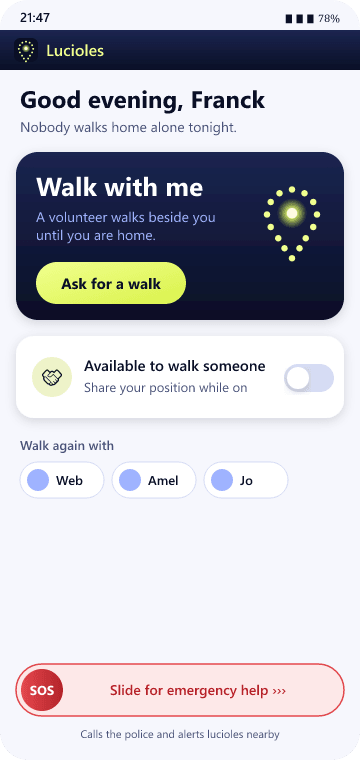
On the “Walk with me” card, one tap on “Ask for a walk”. No reason needed. Available lucioles around you only see “Someone needs a walking companion, 400 m from you”, with no name and no exact position.
-
See who’s coming
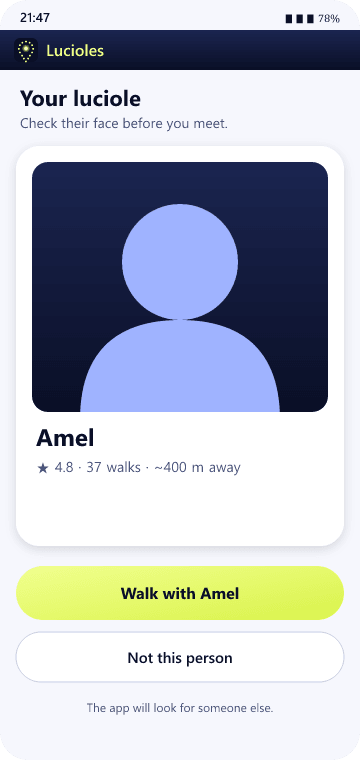
Before you meet, you see your luciole’s selfie, first name and rating. Not comfortable? “Not this person”, and the app looks for someone else. You can meet in a lit, public place.
-
Walk together
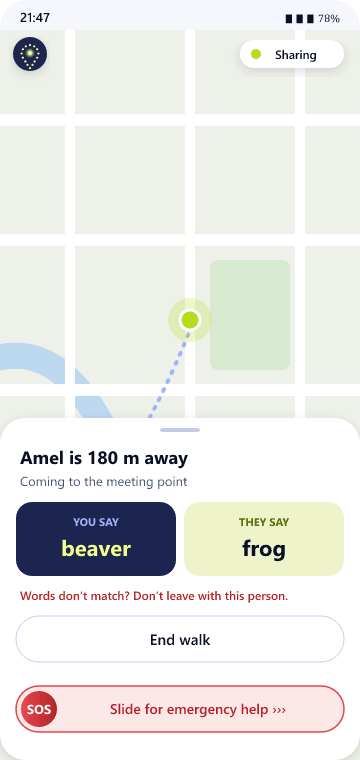
Two keywords prove it’s the right person: you say yours, they answer with the other. At the end, location sharing stops and is erased, and one button tells your people you’re home safe.
SOS
If things go wrong, slide the red button
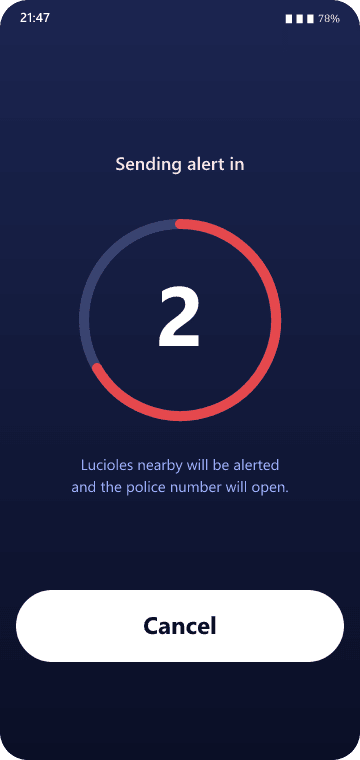
- No accidental alarms. You slide the SOS button all the way, then you have 3 seconds to cancel.
- Nearby lucioles are alerted. Those who can help get an alert with your position. Nobody can promise someone will come: always call emergency services.
- Emergency services, 15 first. In France the call to the SAMU (15) opens ready to go; you tap to call. 17, 18 and 112 are one tap away too.
- Can’t speak? The “Silent help by text · 114” button opens your messages with a text already written, and your position when the app has it. You just press Send.
- Your phone stays quiet. Lucioles makes no sound and no vibration on your phone during the alert. (Your phone’s own ringer follows your silent mode.)
- Your position, only as long as needed. It’s shared with the people helping you until you end the alert, then erased.
- 15 Medical
- 114 By text
- 18 Fire
- 17 Police
- 112 Europe
Lucioles doesn’t replace emergency services. It helps you reach them and alerts nearby lucioles.
Trust and privacy
Our principles, in plain words
No ID checks
No ID card, no address. Just a phone number, a first name, and your word that you’re 18 or over.
A real face
A selfie taken live in the app, not from your gallery. Each side sees the other before meeting, and can say no.
Two keywords
The app gives each pair two words. If the words don’t match, don’t leave with that person.
Never twice in a row
The same pair is never matched twice in a row, unless you ask for that luciole again by name. Nobody can search for someone or see their history.
Location only when you choose
Only during a walk, while you’re available, or during an SOS. Erased at the end. Outside walks and SOS, no tracking.
Emergencies: 30 days, then gone
To deal with misuse we keep who started an SOS, when, and an area of about 5 km. Nothing more precise, and it’s deleted after 30 days.
Open source
The code is open: anyone can check what the app does. The link to the public code is coming soon.
No ads, no company
Lucioles was started by a volunteer, with no company behind it. No advertising, no selling data, nothing to pay for.
Become a Luciole
Ordinary people, with a little extra light
The first lucioles are neighbours, students, people who get home late too. Switch on “Available to walk someone” whenever you like, leaving the cinema or walking your dog, and switch it off whenever you like. No commitment, no rota.
- Who can join? Any adult with a phone and a bit of time now and then.
- Your reputation grows by walking: walks completed, ratings received, and being asked for again by name.
- The sticker. Every luciole can wear the same sticker or pin: a firefly whose tail is a map pin made of a swarm. It’s a sign of pride, not proof of identity. Always trust the app: selfie and keywords.
Once you’ve signed up, switch on “Available to walk someone” on the home screen.
Questions
Frequently asked questions
Is it free?
Yes, free and ad-free. No subscription, no paid version.
Who’s behind Lucioles?
No company. Lucioles is an open-source project started in Lyon by a volunteer and carried by the people who use it.
Will it work on my phone?
Yes: Lucioles opens in the browser of any phone, even an old one, with nothing to install. On Android you can also install the app. On iPhone, add the page to your home screen to get alerts. In a browser, location sharing stops when the screen is locked, so for walks the installed app is safer.
Where does it work?
The app works anywhere, but you need lucioles near you. We’re starting in Lyon, by word of mouth. Tell your friends!
What if the person doesn’t feel right?
You can say no before meeting, and the app looks for someone else. During the walk, either of you can end it at any time, or switch to SOS.
Does Lucioles replace the police or ambulance?
No. SOS opens the emergency call (15 first in France) and alerts nearby lucioles, but nobody can promise a luciole will be there. In danger, always call 15, 17, 18 or 112, or text 114.
Why a selfie?
So you know who’s coming, and the luciole knows who they’re meeting. It’s only shown to the person you’re matched with, and it’s never used for face recognition.
What happens to my location?
It’s only shared during a walk, while you’re available, or during an SOS, and it’s erased at the end. The details are in the privacy policy.